

Conference Calling for Customer Support: A Guide with HeroDash Examples
See conference calling for customer support with HeroDash. Learn to add specialists, manage handoffs, review recordings, and separate agent time from charges.
本文目前仅提供英文版本。查看英文版 →
A customer calls about a device that won’t charge. The support agent has already checked the order and the troubleshooting notes, but a technical specialist needs to ask the customer a few questions. A conference call lets the specialist join the conversation while the agent stays to explain what has already been tried.
Conference calling is a way for three or more people to speak together in one shared phone conversation. In customer support, those people might be the customer, an agent, and someone who can resolve a specific part of the issue. They can clarify the next step together instead of relying on separate callbacks and repeated explanations.
This guide follows that support workflow in HeroDash: choosing whom to invite, briefing them before merging, handing over the discussion, and reviewing the recording and charges afterward. The scenarios below illustrate how a team could use the feature; they are not customer case studies.
On this page
- When to bring a third party into a support call
- Prepare the customer and the specialist
- Add and merge calls in HeroDash
- Review the conversation for quality assurance
- Separate agent time from phone charges
- Test the workflow with your support team
When to bring a third party into a support call
Bring someone in when the customer needs an answer or decision that the current agent cannot provide, and the invited person needs to hear from the customer directly. Identify the question before dialing. If the agent only needs to check a fact internally, a private consultation may be enough.
Technical support escalation
For the device problem, brief the specialist on the symptoms and the checks already completed. After merging, let the specialist ask the customer to describe what happens when the charger is connected. The agent can clarify the order history and record the agreed next step. Adding a specialist gives the customer direct access to that explanation; it does not guarantee that every fault can be fixed during the call.
Returns and logistics coordination
A return pickup may need input from the customer, merchant, and logistics provider. In a shared conversation, the customer can explain availability while the other parties clarify the pickup arrangements. Before ending, summarize who will arrange the collection and who will contact the customer if it changes. Use the conference for the unresolved coordination; avoid making the customer wait through unrelated internal discussion.
Bringing in the client’s responsible contact
For an outsourced support team, a customer may need to speak with someone at the client company who owns the decision. The agent can dial that contact, explain the request privately, and introduce them to the customer. Agree whether the agent should stay to document the outcome or leave after responsibility has been handed over.
An interpreter is another possible participant when people need help communicating across languages. In that hypothetical setup, introduce the interpreter and leave time for each person to finish speaking. The conferencing feature connects the participants; arranging an appropriate interpreter remains a staffing task.
Prepare the customer and the specialist
Tell the customer whom you want to contact and why, then explain that they will wait while you make the connection. Have the issue summary ready before dialing. Give the invited person the question they need to answer and the relevant steps already taken, so the customer can continue from that point.
Call conferencing differs from transferring a caller: several people remain in the same discussion. A supervisor joining to coach an agent is another workflow. Choose the action around who needs to speak and hear the customer. Once the connections are merged, introduce everyone and confirm that they can hear one another.
Add and merge calls in HeroDash
In HeroDash, the support agent can add a participant during either an inbound or outbound conversation. An administrator enables the feature for each business line, meaning each client project, and sets a limit from three to ten people, including the support agent. A business line without the feature enabled does not show it in the dialer.
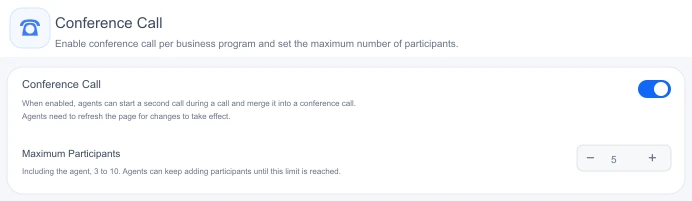
HeroDash business-line settings. This screen has the participant limit set to five.
The sequence begins with Add call. The original customer waits on hold while the support agent dials the specialist. Once connected, the support agent can explain the situation privately; the customer cannot hear that exchange. Before merging, the support agent can switch between the two connections.
Selecting Merge brings the customer, specialist, and support agent into the same conversation. The dialer shows In conference and the participant list. Further people can be added until the project’s configured limit is reached.
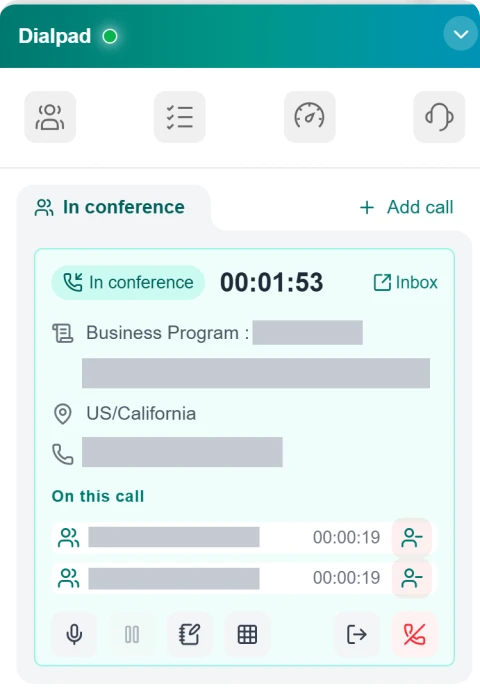
The active meeting and its participant controls. Identifying details are masked.
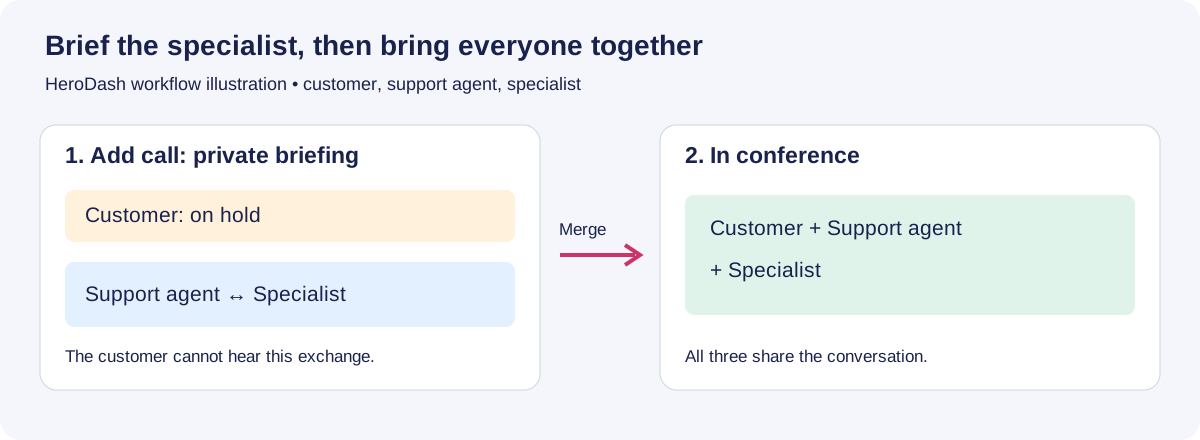
Workflow illustration: the private briefing happens before the connections are merged.
HeroDash’s existing supervisor monitoring follows a different route: a supervisor enters from the management interface. Silent monitor makes the supervisor inaudible to both sides; Whisper lets only the support agent hear the supervisor; Conference mode lets both sides hear them. The new workflow begins with the support agent dialing another person.
Leaving and ending have different effects
HeroDash separates Leave conference from End conference, and both require confirmation. Leave takes the support agent out while the others continue talking; after-call work begins at that point. End disconnects everyone. When only the support agent and one customer remain, the Leave option is hidden.
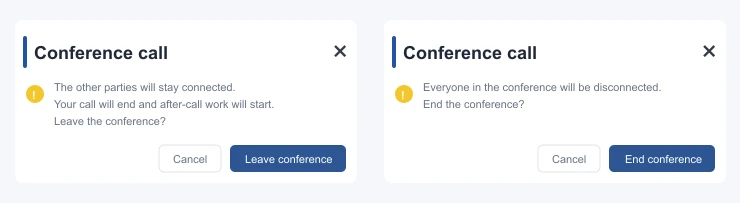
Left: the others stay connected when the support agent leaves. Right: ending disconnects everyone.
The participant controls also include Remove from call. During the conversation, the member list shows a person as having left whether they were removed or hung up themselves. The later timeline distinguishes those events.
The distinction came from a customer request: the support agent needed to step away without cutting off the remaining discussion. It changes what the supervisor must review afterward. The point at which the representative leaves becomes part of the record.
Review the conversation for quality assurance
HeroDash creates a main record with linked participant records. The main record has a participant-count label and a menu leading to each person’s record; hovering highlights the associated group. The timeline shows arrivals, removals, departures, and the support agent’s exit.
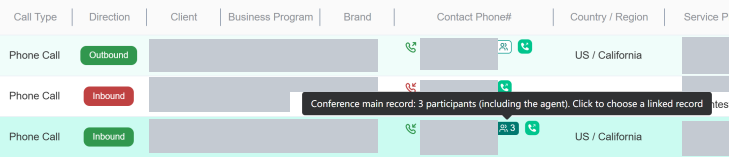
The highlighted main record links the related participant records. Identifying details are masked.
For transcription, the system records each participant on a separate audio track, transcribes those tracks individually, and combines the results in time order. Customer contributions have speaker labels and distinct colors. During development, the team found that silent portions could produce invented text, including “Thank you.” It added preprocessing to pass the portions containing sound to transcription.
The player uses a waveform colored by speaker. As playback advances, the current customer’s avatar and name appear near the progress position. That floating label disappears when the support agent speaks or nobody is speaking. A tester suggested the change after finding it awkward to keep looking back at the color key during a long recording.
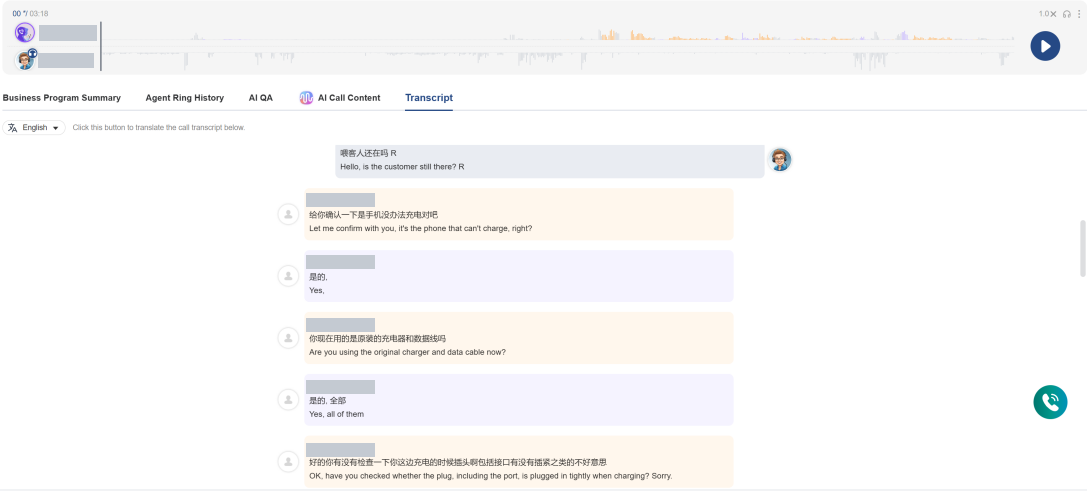
The recording waveform and color-coded transcript entries shown together. Identifying details are masked.
When the support agent leaves, the remaining participants’ audio and transcript are preserved, with Agent left the conference marking the departure. A reviewer can assess the representative’s portion while retaining the later discussion for context. This is useful alongside call center analytics, where the time field and the part of the conversation being evaluated need to agree.
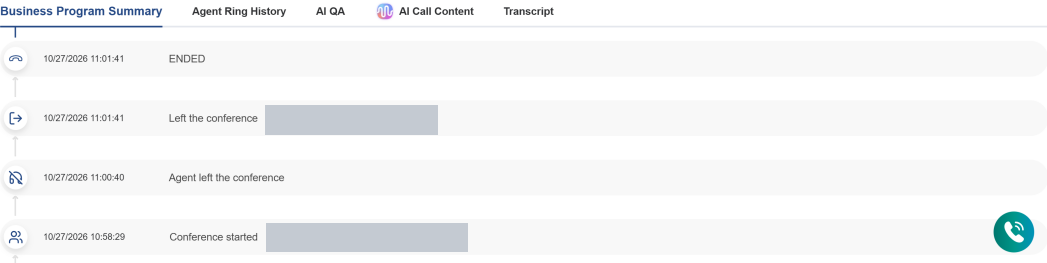
The timeline preserves the support agent’s departure before the remaining conversation ends.
Separate agent time from phone charges
A meeting’s duration, a staff member’s conversation time, and the total connected line time can be different. In HeroDash, the recorded billing duration continues until the last customer disconnects. The support agent’s conversation time stops when that person leaves, and after-call work starts then.
The carrier charges for each external line while it remains connected. Consequently, the duration on the main record alone does not describe the total external line minutes.
Consider this hypothetical example. Customer A connects at minute zero, specialist B connects at minute two, and the support agent leaves at minute eight. A and B both disconnect at minute twelve. Assume both external lines are timed from connection to disconnection without rounding.
| Measurement | Calculation | Result |
|---|---|---|
| Support agent’s conversation time | 8 − 0 | 8 minutes |
| Main conversation’s elapsed span | 12 − 0 | 12 minutes |
| A’s external line time | 12 − 0 | 12 minutes |
| B’s external line time | 12 − 2 | 10 minutes |
| Combined external line time | 12 + 10 | 22 line minutes |
The 22 line minutes are a usage quantity, not a price. To calculate a charge, apply the applicable rate and billing increment to each line. If destinations have different rates, price them separately before adding the charges. Package allowances may also affect the invoice.
This distinction also helps operations teams avoid assigning the remaining participants’ discussion to the support agent’s conversation time. The representative can be completing notes while the external lines are still in use.
Test the workflow with your support team
Use a realistic support issue in the demonstration: keep the customer connected, dial a specialist, explain the case privately, then merge. Have the agent leave after an explicit handoff. Review what the customer experiences and what the supervisor can see afterward.
Participant limits need their product conditions. Zoom’s documentation distinguishes Zoom Phone Basic, with up to three participants, from Pro, with up to ten; its multi-party feature also has account and client requirements (Zoom, 2026). Check the plan and enabled settings before designing a workflow around the headline maximum.
Exit behavior varies too. Amazon Connect’s CCP documentation says the original caller and an external participant can continue after the support agent disconnects; a connection with only third parties remaining is terminated (AWS, 2026). Test the exact combination of people who will remain.
Use the following checks in a trial or demonstration:
- Can an outside participant join using the instructions you sent?
- Can the organizer explain the situation privately before merging?
- What happens when the organizer leaves, and who can end the remaining discussion?
- Does the recording show enough speaker and attendance information to review a decision?
- Who can access the saved material, and what retention settings apply?
- Can the usage report explain the charges on the invoice?
For a customer service operation, also assign the human responsibilities around the software. Callnovo.ai provides human customer support in 65+ languages. Decide who speaks with the customer, who owns a technical or commercial decision, and when a separate interpreter is needed. Language coverage and a participant-addition button answer different planning questions.
If you are building a dedicated support team, include those responsibilities in the project design. Callnovo.ai can demonstrate the HeroDash handoff using the roles your team needs, so you can inspect the controls and the resulting record together.
Before the next customer handoff
Can every participant use the joining method? If someone can’t enter from the device or number they have, resolve that before scheduling the discussion around them.
Who owns the conversation after the organizer leaves? If nobody can answer, agree on the handoff first. A working Leave button does not assign responsibility for the customer’s next step.
Can the record and invoice explain when people left? If they show different durations, compare staff time, meeting span, and individual line usage. Those measurements may all be correct while describing different parts of the same event.
References
- Zoom: Using Zoom Phone multi-party conferencing calls, accessed October 26, 2026.
- AWS: Host multiple participants in the Contact Control Panel, accessed October 26, 2026.