

Choosing a Zendesk Alternative: Costs, Fit and Migration
Compare Zendesk alternatives by workflow, billing unit and migration requirements. Use a cost worksheet and ticket-level pilot to assess your shortlist.
本文目前仅提供英文版本。查看英文版 →
A Zendesk alternative needs to support the work your team already does: receive a request, find the relevant customer information, assign responsibility and leave a usable record. A lower advertised seat price is useful only if the proposed setup also covers the channels, permissions and workflows you need.
This guide compares alternatives to Zendesk using their published product and pricing information, checked on October 29, 2026. It includes a budget worksheet and a migration checklist you can use with your own requirements. Callnovo.ai offers HeroDash, which is included below. We haven’t run a comparative performance test of the listed products; the pilot section draws on our published HeroDash demonstration and proposes checks to run on your shortlist.
Choose a shortlist around the work you need to keep
Start with a case your team handles regularly. List where it arrives, which customer records the agent needs and what happens when someone else must make a decision. A shared inbox may cover a small email queue. A team handling phone calls, live chat and messaging needs to check channel support and how records move between those channels.
Write down the problem prompting the switch. If it is cost, collect the current invoice and usage breakdown. If it is administration, identify the rules or reports that take time to maintain. If agents cannot find account context, record which data they need and where it currently lives. Use that problem to decide which products to evaluate.
For a team already using a CRM, preserving customer identity and permissions may be a deciding requirement. For an ecommerce operation, order context and the approval path for refunds may matter more. For multilingual support, test the actual languages and the handoff to a person who can handle an exception.
Keep the shortlist small enough to evaluate using the same case. Name the requirement that each candidate must meet and the person who will accept the result. A feature list is a starting point; the pilot determines whether the configuration works for your team.
Price the same operating workload
Help desk software uses several billing units. Per-agent subscriptions, workspace plans, ticket allowances and charges for automated outcomes cannot be compared by placing their lowest advertised prices in one column.
| Cost component | What to put in your worksheet | What to verify in the quote |
|---|---|---|
| Seats or workspace | Required agent and administrator access | Minimum seats, included users, extra-user charges and billing term |
| Customer contacts | Expected email, chat, messaging and phone activity | Channel availability, telephony and message usage charges |
| AI work | Expected billable outcomes or other specified units | What counts, included allowances, overages and disputed charges |
| Workflow features | Required routing, reports, knowledge base and permissions | Which plan includes each requirement |
| Setup and transition | Data mapping, configuration, training and overlap | One-time fees and work your own team must perform |
Use a monthly operating estimate plus a separate transition budget:
Monthly estimate = subscription + expected usage + selected add-ons + ongoing administration.
For illustration, ten seats on Zendesk Suite Team at its published annual-billing rate of US$55 per agent per month produce a US$550 monthly subscription equivalent (Zendesk, 2026). Ten seats on Freshdesk Growth at US$19 under annual billing produce US$190 (Freshworks, 2026). These are different product configurations. The difference is not an estimate of savings from switching with equivalent features.
For our own product, ten standalone HeroDash omnichannel seats at US$60 per seat per month under annual billing, plus the US$50 monthly Ticket AI account add-on, produce a US$650 monthly equivalent before other selected add-ons and usage. Check the HeroDash pricing and service options against the proposed arrangement. Software subscriptions and staffing services use different billing units. If your evaluation includes staffing, Callnovo.ai offers human customer support in 65+ languages. Review the multilingual support requirements separately from the software quote and specify the languages your team actually needs.
Ask each vendor to price the same workload and list exclusions. Run a second estimate for a busier month, including any threshold that would move you into another plan. Keep the contract term visible: a monthly equivalent under an annual commitment does not mean you can cancel every month.
For an AI agent, use the vendor’s exact billable event. Intercom currently describes Fin pricing in terms of outcomes. Gorgias distinguishes helpdesk ticket volume from automated interactions. A conversation, a ticket and an outcome may cover different amounts of work. Treat them as separate columns until the contract explains their relationship.
Compare the options by fit and verification task
The table below identifies reasons to evaluate each Zendesk competitor. The verification column contains suggested pilot tasks, not claims that we have tested those tasks on every platform. When comparing Zendesk competitors, confirm the required feature in the quoted plan.
| Option and official source | Published capabilities relevant to selection | What to verify with your workflow |
|---|---|---|
| Freshdesk | Ticketing, shared inbox and knowledge base; routing, multilingual support and controls vary by plan | Route a case to the correct queue and check whether your language, SLA and reporting requirements change the required tier |
| Help Scout | Collaborative inbox and knowledge tools, with communication channels and service features offered across plans | Have two agents handle one request; check ownership, notes and the customer-facing reply across your required channels |
| Intercom | Customer support platform and Fin AI Agent; Fin can also work with an existing helpdesk | Trace a case from AI handling to a human, then inspect how the billable outcome and unresolved work are recorded |
| Crisp | Workspace-based customer communication, inbox, chat and automation capabilities | Check the agent, contact, channel and AI limits of the proposed workspace; some extras and higher limits cost more |
| Zoho Desk | Ticketing and tiered service features, with a free edition for three users | Test the knowledge base and routing you need; request pricing in your currency and the required paid edition |
| HubSpot Service Hub | Service workspace connected to Smart CRM, with ticket routing, knowledge and service management capabilities | Inspect the customer record visible to an agent and confirm required permissions, reports and plan dependencies |
| Salesforce Service | Case management, knowledge and customer context within its CRM environment | Test the case process and integration responsibilities with your Salesforce administrator |
| Gorgias | Ecommerce-focused helpdesk; helpdesk ticket volume and AI interactions are separate billing considerations | Use an order-related request and check permissions for the next action, seasonal ticket volume and AI charges |
| HeroDash | Our communication and ticketing platform, with configurable fields and Ticket AI | Check channel configuration and a changing customer request; verify the summary, manual controls and next owner |
You don’t need to migrate simply because another platform has a feature you might eventually use. If your current tool handles the required work, compare the cost of correcting its configuration with the cost and disruption of moving. Conversely, a low-cost alternative to Zendesk may still be unsuitable if an essential control requires a different plan or substantial custom work.
A free edition can be useful for a small pilot. Separate a permanent free plan from a timed trial, and record the user or feature limit that would require an upgrade. The same care applies to a paid platform’s AI allowance: an included quantity should not be treated as unlimited automation.
Pilot a changing request before moving the queue
An ordinary request that changes midway through the conversation can expose problems that a clean demonstration misses. In our published HeroDash AI agent assist demonstration, a test customer reports an unusual blender noise and later requests a refund. The record must retain the original problem while reflecting the later request. The refund remains pending.
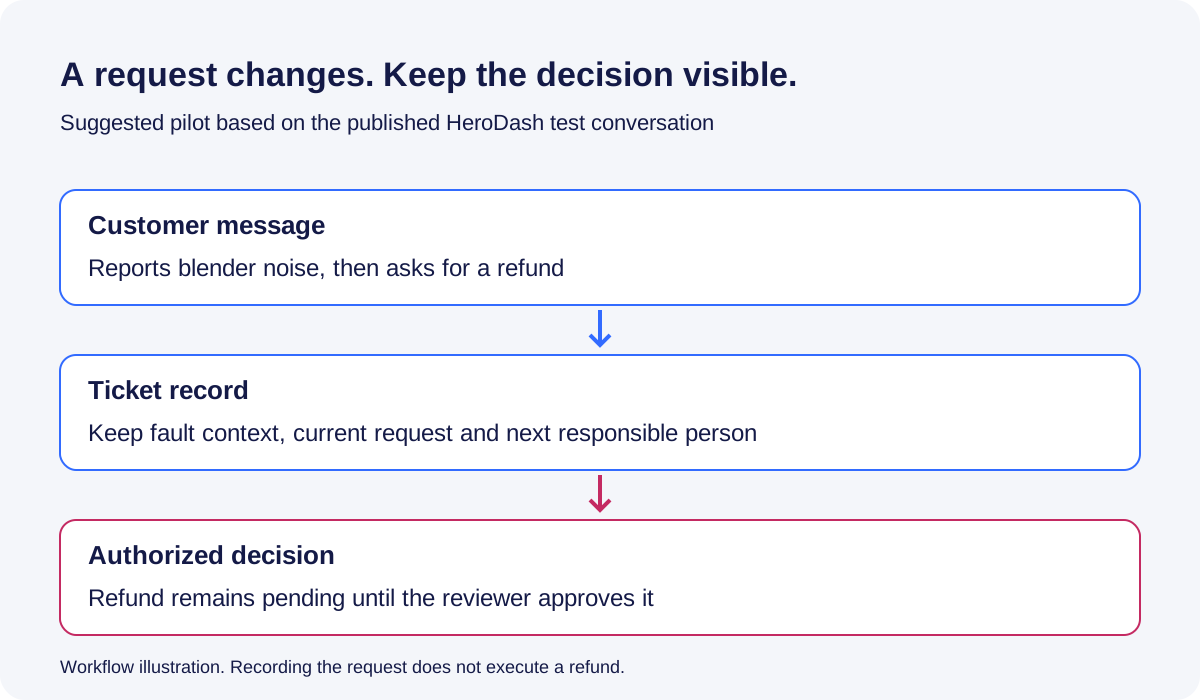
Use that pattern with a fictional case appropriate to your business. Give each shortlisted product the same conversation, field instructions and approval boundary. Keep the source conversation available to the reviewer.
| Stage | Record to inspect | Acceptance question |
|---|---|---|
| Initial fault report | Product issue and supplied order reference | Can the reviewer trace each value to the message? |
| Later refund request | Updated request and retained fault context | Does the record reflect the customer’s current request without erasing relevant history? |
| Handoff | Current status, next action and responsible person | Is it clear that a request has not yet been approved? |
| Missing information | Empty or explicitly unresolved field | Did the system invent an identifier or commitment? |
| Human correction | Field value and subsequent updates | Does the configured behavior preserve the correction as intended? |
HeroDash Ticket AI organizes its summary into customer issue, key facts, conversation progress, actions taken, current outcome and next steps. In the published test, those sections distinguish the request from the work still to be done. That distinction is the useful acceptance criterion: the next agent should be able to tell whether a refund was merely requested or actually approved.
The product’s documented controls also distinguish protection for human-edited values, deliberate reanalysis of selected fields and undoing a fill operation. Test each separately in the proposed configuration. Our published screenshot of the reanalysis controls does not itself demonstrate that reanalysis was executed successfully, and undoing one fill should not be assumed to prevent later updates.
Include timing in the trial. HeroDash’s documented event triggers run on events, while its time-based automation is scanned hourly. Ask how each candidate handles its own timing rules, then observe when your sample case actually changes state. Do not turn a scheduled follow-up requirement into an untested promise of an immediate action.
Record the source message, expected value, observed value and reviewer decision for every check. If the result is wrong, preserve the failure before changing the instructions. Rerun it after the change and retain both results. Keep those records with the purchase decision so reviewers can see which cases passed and which still need work.
Check exports and cutover before signing
Check the source export path before committing to a migration date. Zendesk’s export documentation says exports are disabled by default and the account owner must request enablement. The report-based export tools described there are unavailable on Team plans, although the REST API is available across plans for exporting data.
The same documentation says CSV exports omit ticket comments and descriptions, among other exclusions. It also states that AI agent tickets cannot be exported through the documented account export. An exported file therefore needs to be checked against the information you intend to preserve. Don’t assume that a CSV containing ticket numbers contains complete conversation history.
Use a mapping worksheet before importing a sample:
| Source information | Destination decision | Acceptance check |
|---|---|---|
| Requester and organization | Matching identifiers and duplicate-handling rule | Correct customer associated with the case |
| Comments and attachments | Supported import method and access permissions | Reviewer can read the necessary history and files |
| Status, owner and custom fields | Explicit mappings and handling for unsupported values | Open work remains open and assigned correctly |
| Knowledge articles and links | Destination URLs and content ownership | Required answers and internal links remain usable |
| Rules and reports | Recreated configuration and accountable owner | Sample case follows the intended route and appears in the right report |
Run a limited migration first. Include a case with several replies, an attachment, a reassignment and a nonstandard field. Compare the source and destination records with the people who use them. Check access as an ordinary agent as well as an administrator.
Before cutover, agree on these responsibilities:
- Name the person handling new messages during the transition.
- Define how changes after the initial export will be transferred.
- Tell agents which system to use and when the change takes effect.
- Record how to recover if a required workflow fails.
Use this final acceptance checklist with the support owner:
- Required conversation history and attachments are readable.
- Open requests retain the correct owner and status.
- Ordinary agents have the intended access permissions.
- Routing and reports pass the agreed sample cases.
- Unresolved exceptions and a fallback procedure are recorded.
A fixed overlap period is less useful than explicit acceptance criteria and a named decision-maker.
To evaluate HeroDash alongside other Zendesk alternatives, send us a redacted workflow and your channel requirements. Include the number of users, expected volumes, required fields and a case that needs a human decision. We can discuss the configuration and quote against that scope while you use the same requirements to assess the other candidates.
References
Official product and pricing pages were checked on October 29, 2026; the year in the cost examples identifies that check, not the original publication date. Plans and quotes can change.
- Zendesk plans and pricing.
- Freshdesk plans and pricing.
- Zendesk account data export requirements and exclusions.
- The product matrix links each option to its official product or pricing page; the pilot links to the published HeroDash demonstration.