

HeroDash AI Agent Assist: Ticket Updates and Human Control
Explore HeroDash AI agent assist through Ticket AI: ticket updates, conversation summaries, agent edit protection, manual reanalysis, and undo controls.

AI agent assist helps human support staff use information while handling customer requests. In the HeroDash platform offered through Callnovo.ai, Ticket AI handles a specific part of that work: filling ticket fields and keeping a summary as the conversation develops.
A customer reports an unusual noise from a blender and provides an order number. Later, they ask for a refund. The support representative needs a record that preserves the fault, captures the changed request, and tells the next colleague what still needs attention.
This guide follows that sequence through a HeroDash test ticket. It explains how ticket updates work, what happens after a human correction, and how a supervisor can check the resulting record.
What AI agent assist means for a support team
Agent assist covers several kinds of help for people serving customers. IBM’s explanation describes tools that surface relevant information and provide real-time guidance. Depending on the product, a support representative might receive a suggested answer, retrieve material from a knowledge base, or get help preparing the record for a handoff (IBM, 2024).
Choose a task to test before comparing features:
| Support task | Useful output | What the person still checks |
|---|---|---|
| Answer a product question | Relevant guidance or a suggested response | Whether it applies to this customer’s situation |
| Record a changing request | Updated ticket fields | Whether each value follows from the conversation |
| Hand over an open case | A summary of progress and outstanding work | What was completed and who must act next |
Ticket AI focuses on the record. It reads conversation information, fills configured fields, and maintains a ticket summary. Customer replies remain a separate responsibility. A team looking for live answer recommendations should evaluate that capability separately from ticket preparation.
For a support supervisor, this distinction keeps the trial practical. A convincing reply suggestion tells you little about whether an order number is copied correctly or a refund request is recorded as pending.
Separate customer replies from ticket preparation
A customer request, a ticket classification, and a completed business action represent different stages of work. “Refund requested” records what the customer wants. A payment confirmation establishes that money was returned. The person handling the case needs to be able to distinguish them throughout the conversation.
Zendesk’s intelligent triage documentation provides a useful example of the separation. Classifications become ticket fields; its damaged-item example then uses a configured trigger to route the request. The classification supplies information for a workflow.
In HeroDash, the administrator defines which fields Ticket AI should maintain and supplies instructions for filling them. The module can also choose among specified ticket forms. In the test ticket below, the AI write history records a switch to an after-sales form alongside the fault description and refund request.
Analysis runs at configured points in the workflow. The product design distinguishes a pause in chat from the end of a conversation, and checks for new content before another analysis. A phone conversation becomes input after its transcript is ready. These timing differences matter when staff check whether a value reflects the latest exchange.
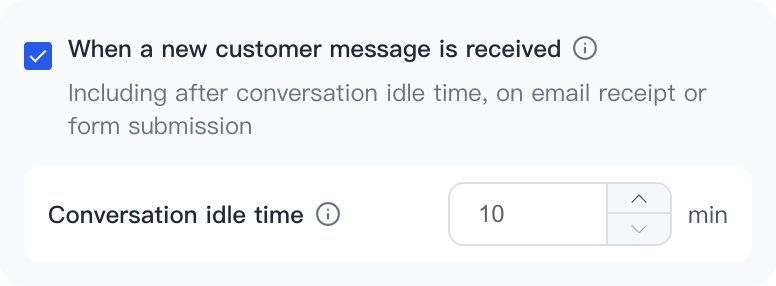
This test configuration waits 10 minutes of conversation idle time for the customer-message trigger.
An administrator testing the workflow should note which event ran, which messages were available, and which field changed. If a new request hasn’t reached the record yet, checking the trigger is more useful than repeatedly correcting the same value. For the wider process of setting priorities and assigning work, see our ticket triage and routing guide.
Follow one conversation from fault report to refund request
In a HeroDash test conversation, the customer reports an unusual noise from a blender and supplies the test order reference ORD-BOTH-001. A representative asks them to wait. The customer then sends a follow-up message saying they have changed their mind and want a refund.
The AI write history shows eight writes in one run, including the after-sales form, ticket description, order reference, fault description and title. The description brings the fault report and refund request together. A later run writes the ticket summary.

Test environment screenshot. The English description says the blender makes an unusual noise and the customer requests a refund for test order ORD-BOTH-001.
The fault stays the same as the customer changes their request:
| Point in the conversation | Information to preserve | Change to inspect |
|---|---|---|
| Customer reports the fault | Test order reference and unusual blender noise | Trace the stored fault and order fields back to the message |
| Customer requests a refund | Original fault and order context | Description and title include the refund request |
| Conversation ends | Representative asked the customer to wait; refund remains pending | Summary records the request and next step |
A reviewer should be able to follow that change without treating the earlier request as the current one. They should also be able to trace the order reference back to the customer’s message.
Ticket AI uses six summary sections: customer issue, key facts, conversation progress, actions taken, current outcome, and next steps. Read the sections together. In this test, the summary records the representative’s request to wait under actions taken. The current result says the refund request is pending, and the next step is to verify the order and handle the request. “Customer requested a refund” belongs in the account of the request or conversation. An entry under actions taken needs evidence of something actually done.
When using this scenario in training, ask the next representative to explain whether the refund has been approved. If the conversation contains only a request, the handoff must preserve that unresolved decision. The summary should make it possible to continue the case without silently granting approval.
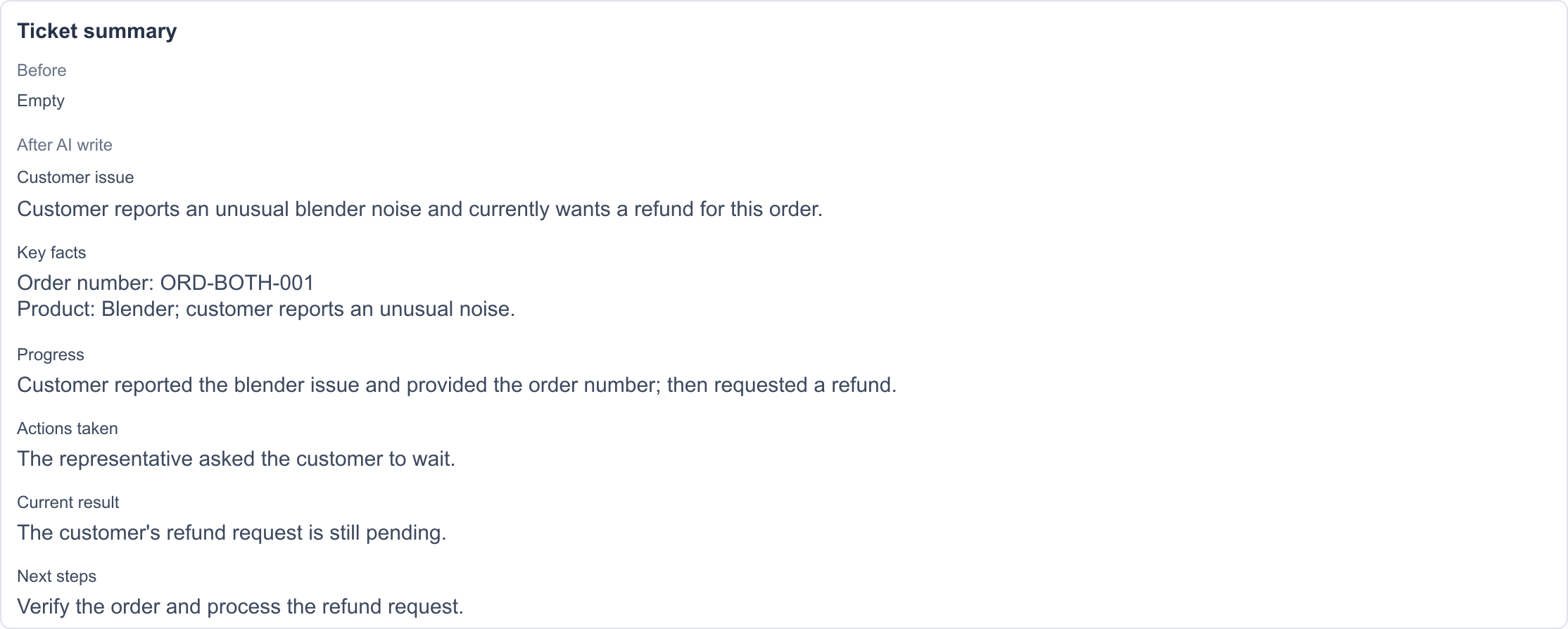
The test summary preserves the difference between the customer’s request, the representative’s reply and the work still to be done. The test content is shown in English.
Keep the original conversation available during review. A short record can omit the sentence that changed the customer’s preferred outcome. Checking that sentence is part of assessing the summary’s usefulness.
For AI-to-human handoffs, the escalation guide covers the separate questions of escalation logs and billing.
Keep human corrections distinct from reanalysis and undo
Ticket AI protects human-edited field values from automatic updates. A person can explicitly select a field for manual reanalysis. The separate “undo this fill” action reverses a fill operation; new conversation content can still lead to a later update.
During development, the team considered a frustrating sequence: a representative corrects a value, the customer sends another message, and AI changes the field back. Human-edit protection addresses that sequence. The deliberate reanalysis action gives staff a way to ask for a fresh assessment when they want one.
| Action | What it does | Follow-up test |
|---|---|---|
| Edit a field manually | Protects the human correction from automatic updates | Add a relevant customer message and inspect the field |
| Run manual reanalysis on a selected field | Explicitly requests another analysis of that field | Compare the result with the selected scope and conversation |
| Use “undo this fill” | Reverses that fill operation | Inspect the restored value, then test a later message separately |
The development team also encountered confusion after undo: a tester reversed a fill, then a new message caused another update. The two events need separate explanations during training. Undo reverses an operation. Editing a field to the correct value invokes the protection for human changes.
Use a fictional ticket to rehearse both paths. Save its initial values, make a human correction, and add a message that would otherwise change the field. Record the result before requesting manual reanalysis. Test undo in a separate sequence so a reviewer can tell which action caused each change.
Keep the earlier and later values alongside the operation that changed them. Record each test result separately so a failed recovery step remains visible.
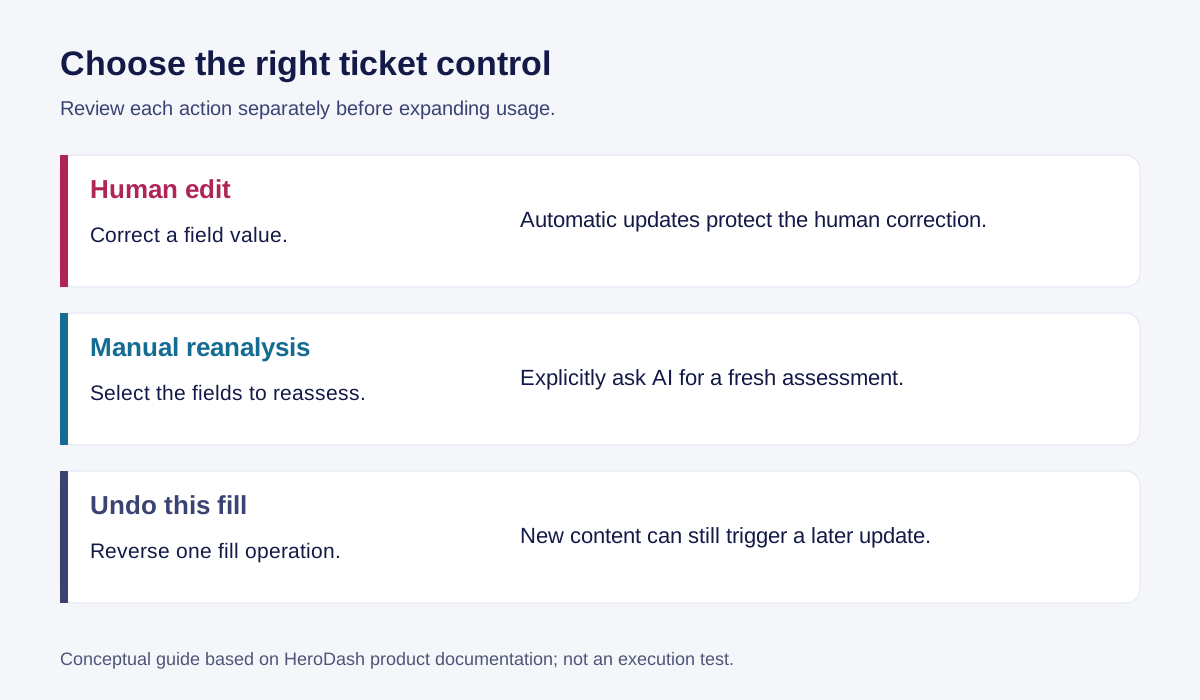
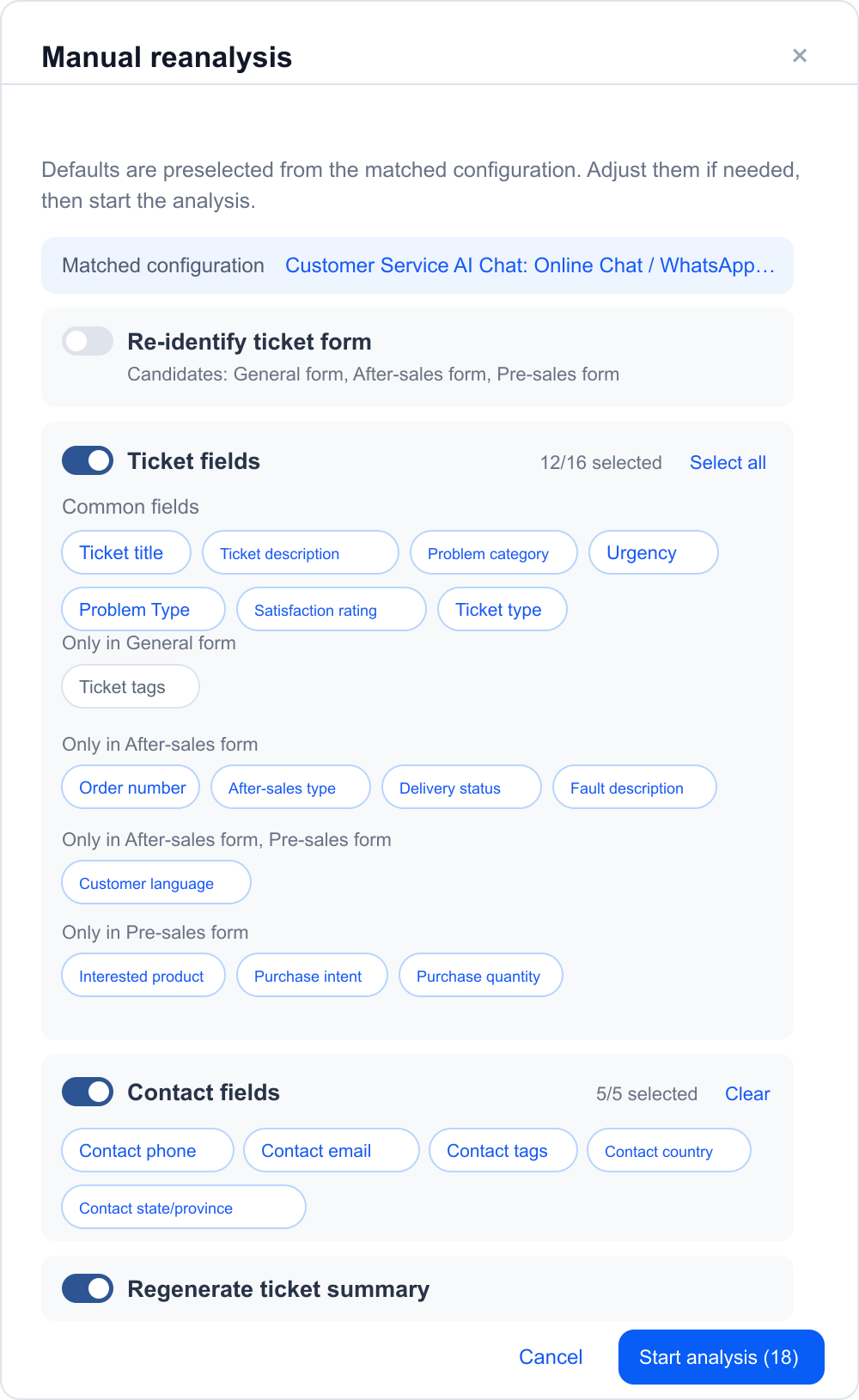
The test interface lets the reviewer choose the scope before starting manual reanalysis. The screenshot shows the controls before execution.
Test missing information before trusting a field
A field can contain a permitted value and still be wrong. An allowed-option list checks the available choices; review against the conversation checks whether the selected choice is justified. Include missing information and conflicting statements when you test the workflow.
Start with cases like these:
| Test case | What to check | Serious error to catch |
|---|---|---|
| Customer gives no order number | The field remains unsupported or empty | An invented identifier |
| Customer mentions two orders | The fault is attached to the correct order | Details combined across purchases |
| Customer denies wanting a refund | The denial remains clear | A refund request inferred from a keyword |
| Customer changes the requested outcome | The record reflects the later statement | An outdated request presented as current |
| Customer asks for approval | The decision remains open until approved | “Requested” rewritten as “approved” |
Check summaries for omissions as well as additions. A record may preserve the fault perfectly but omit the promised callback or its owner. Before testing, decide which errors make a record unacceptable: an incorrect amount, an invented commitment, a wrong case status, or a missing next action could each qualify for your workflow.
For each failure, keep the source message, the generated value, and the relevant field instruction. That lets the administrator distinguish unclear instructions from an output that contradicts an explicit statement. Review recurring errors together before revising a rule.
Phone transcripts need an additional check. If the transcript contains the wrong product identifier, field extraction may carry that error into the ticket. Compare the transcript with the recording when investigating the value. The broader reporting context is covered in our call center analytics guide.
Evaluate the workflow with supervisors and new agents
Evaluate record accuracy alongside review time. A summary that takes less time to read can still leave a new hire uncertain about what to do next. Give supervisors a consistent worksheet and ask new staff to explain the case in their own words.
A 2025 study in The Quarterly Journal of Economics examined 5,172 support agents at a business-software company and found a 15% average increase in issues resolved per hour after access to AI assistance. The tool suggested responses during chats, and results varied by experience and skill (Brynjolfsson et al, 2025). This is evidence from a particular workplace and task; a ticket-preparation trial needs its own measures.
How do agent assist technologies reduce onboarding time for new agents? Access to relevant information and conversation context can reduce searching, but training still has to establish whether the new hire understands the case. In an agent assisted workflow, ask the person to identify the current request, completed actions, and next unresolved step. Compare their answer with a supervisor’s reading of the full conversation.
Before the trial, make the field instructions explicit. HeroDash’s configuration approach uses four elements: what to fill, whose statements to use, how statements map to options, and when to leave the field empty.
For a delivery-status field, an illustrative instruction is:
Use the customer’s statements about receipt of the order. Choose the configured received option when the customer confirms delivery. Choose the configured not-received option when the customer says it hasn’t arrived. Leave the field empty when receipt isn’t stated or the statements conflict.
Match the option names to the form. Test this instruction against the customer’s messages; delivery-system lookups are a separate task.
A supervisor can then compare the record with its source. HeroDash’s fill details show before-and-after values and information about the rule and time associated with a fill. Use those details to investigate the reason for a correction.
Record the following measures for the same set of reviewed tickets:
- Field correction share: AI-filled fields requiring correction divided by AI-filled fields checked.
- Serious-error share: reviewed tickets with at least one predefined serious error divided by all reviewed tickets.
- Review time: time spent reading, checking and correcting the record.
- Handoff comprehension: whether the receiving representative correctly identifies the current request and next action.
Keep ticket-level and field-level denominators separate. A ticket with several bad fields is one ticket with an error but several field corrections. Report the sample counts with the rates, and compare similar case types. Split results for newer and experienced staff where the sample allows it.
When comparing AI agent assist software, give each tool the same task. A product offering live suggestions from a knowledge base needs a different test from one maintaining handoff records. Agent assist software should be judged against the work your team expects it to perform, including the effort needed for human oversight.
Decide who will review the records across shifts and languages. Callnovo’s human agents provide support in 65+ languages through its multilingual support service. For a dedicated team whose agents you select and manage, review Hire Your Team. Include ticket review, escalation ownership and language-specific checks in the team’s responsibilities.
To discuss a Ticket AI workflow with Callnovo.ai, bring a redacted example conversation and the fields your team needs to maintain. Discuss your ticket workflow, or see the HeroDash customer service platform for the wider platform context.
If this pilot is part of replacing an existing helpdesk, our Zendesk alternative selection guide connects the ticket checks to plan costs and migration requirements. Keep the manual-correction, reanalysis and undo tests separate when you compare candidate configurations.
Check ownership and recovery before expanding usage
Keep examples from the trial that show how a human correction, selected-field reanalysis, and undo behave. Use them in training so staff can recognize which operation they need.
Use this review checklist on each trial ticket:
- Match the order reference and fault to the customer’s message.
- Identify the latest request and check that it is still recorded as pending if no approval exists.
- Record any human correction and test automatic updates separately from deliberate reanalysis.
- Check the restored value after undo and record any later update as a separate event.
- Ask the receiving representative to identify the next action and its owner.
Before expanding AI agent assist, answer these questions with a ticket your team has actually reviewed:
- Who owns the value after a human correction? Show what happens at the next automatic update and when someone deliberately requests reanalysis.
- What does undo restore? Check the reversed fill separately from any later analysis of new customer content.
- Can the next representative tell a request from a completed action? A refund request, an approval, and a paid refund should remain distinguishable in the record.
References
- IBM: What is agent assist?. Published December 3, 2024.
- Zendesk: About intelligent triage. Accessed October 27, 2026.
- Brynjolfsson, Li and Raymond: Generative AI at Work. The Quarterly Journal of Economics, 2025.