

Ticket Triage: Sort Support Tickets by What Expires First
Ticket triage sorts support tickets by urgency, channel, and who can fix them. A six-step process, priority levels, routing rules, and where AI should stop.

Most support queues have an invisible rule: first in, first out. It feels fair until a customer asks to change an address 10 minutes after placing an order, while another customer asks a general delivery question that can wait until tomorrow.
Ticket triage decides which support ticket needs attention first, who should own it, and what that person is allowed to do. In ecommerce support, priority often depends on a deadline outside the support team: the warehouse ship cutoff, an order’s fulfillment status, or a refund window. If the team misses it, a request it could have fixed may become a return, a reship, or a public complaint.
This guide separates triage from routing, gives six steps, and shows where automation should stop.
On this page
- TL;DR
- How triage differs from ticket routing
- Triage in customer service is not IT triage
- The triage process in six steps
- A practical example
- Manual, rule-based, or AI triage
- Night-shift handoff
- Checklist
- FAQ
TL;DR
The queue should not ask only, “Which ticket arrived first?” It should ask, “Which ticket becomes impossible to fix first?”
| Ticket | Clock that is running | If missed | Route to | Authority needed now |
|---|---|---|---|---|
| Change an address before shipment | Warehouse cutoff and fulfillment status | Return, reship, or failed delivery | Order-capable agent | Address correction or cancellation within the brand’s limit |
| Duplicate charge or refund not received | Payment and refund window | Escalation, dispute, or loss of trust | Billing-skilled agent | Refund verification; approval for exceptional compensation |
| Device cannot be configured | Customer’s usage window and promised response time | Repeat contact and avoidable return | Product-skilled agent | Troubleshooting; technical escalation inside the same contact |
| First “where is my order?” question | Carrier and promised delivery date | Anxiety, but usually still recoverable | Order-status queue | Tracking explanation |
| Second delivery question | Previous response and customer patience | Churn or complaint | Senior order-status agent | Proactive recovery within agreed limits |
| Night-time urgent request | The same external cutoff, despite local office hours | Morning backlog and a missed cutoff | Active shift or follow-the-sun team | The handoff must include red-line rules and limits |
The rule is simple: process the ticket whose consequence becomes irreversible first, then the ticket with the greatest impact, and only then arrival order. Ticket volume matters for staffing, but this page does not estimate it; use the ticket volume guide, and for phone queues the Erlang calculator turns call volume into a headcount.
How triage differs from ticket routing
Triage is the review before someone starts work on a ticket. Check what the customer needs, how urgent it is, what happens if it waits, when action is due, and who has permission to finish the job. Ticket routing then sends it to the right queue, skill group, or agent.
| Triage | Ticket routing | |
|---|---|---|
| Main question | How soon must someone act, and what outcome is at risk? | Which queue or skill group should receive it? |
| Output | Priority, deadline, category, escalation level, authority | Assigned queue, language, product, or agent |
| Typical failure | Treating every request as FIFO | Sending an urgent ticket to a team that cannot finish it |
| Timing | Before normal work begins | After enough information exists to assign ownership |
In a help desk, triage decides the order and the owner; routing delivers the ticket to that owner’s queue or skill group. A team can route every ticket correctly and still fail if it triages them in arrival order.
Four assignment patterns cover most support operations:
- Rule-based assignment sends tickets with a known phrase, channel, product, or status to a fixed queue. It is useful for stable red-line requests such as “cancel order.”
- Skill-based routing matches the ticket to language, product, region, or technical skill. It is useful when the first agent needs product knowledge rather than spare capacity.
- Round-robin assignment distributes tickets evenly. It is useful for comparable, low-risk requests, but it should not override an external deadline.
- Workload-based assignment considers active assignments and queue age. It helps balance work after priority and skill have already been set.
In a voice workflow, a call may enter a queue, use a menu choice to identify the broad request, and then move to a sales or after-sales skill group. That is routing. Triage still has to answer whether an address change can wait behind a routine delivery question.
Triage in customer service is not IT triage: the clocks are different
IT service desk triage usually measures urgency against an internal service-level target. For teams working on triage customer service processes, add another question: will something outside the service desk, such as a shipment leaving the warehouse, make the request harder to fix before that target is due?
The familiar model is impact × urgency. Keep it. A widespread outage should still outrank a low-impact request. The missing piece is that urgency is not always created by the support team’s response times or SLAs.
| IT service desk | Ecommerce customer service | |
|---|---|---|
| Primary clock | Internal SLA and service availability | Fulfillment, payment, carrier, or platform event |
| Failure after deadline | SLA breach or downtime continues | Address cannot be changed, order ships, refund window narrows, or return cost rises |
| Can the team repair it later? | Often, with restoration or escalation | Sometimes not; the external event may be irreversible |
| How to set the SLA | Start with service impact and target response | Start with the external cutoff, then subtract queue and handling time |
Shopify’s own help documentation makes the distinction concrete: merchants can edit unfulfilled items, but they cannot remove fulfilled items or adjust their quantity. For some orders, once a line item has been fulfilled, the order cannot be edited. A change-of-address ticket handled after the warehouse ships has already become a return or reship problem.
Build an external-clock table before setting priority labels:
| External clock | Who controls it | What missing it creates | How to set the support target |
|---|---|---|---|
| Warehouse pick, pack, or ship cutoff | Warehouse or 3PL | Address correction becomes a return or reship | Target response before the cutoff, with buffer for verification |
| Order fulfillment status | Store and fulfillment system | Some order fields are no longer editable | Show status to the agent before the agent promises a change |
| Refund or payment review window | Payment provider and brand policy | A preventable dispute or delayed refund | Route billing requests to someone who can verify the transaction |
| Carrier handoff or delivery exception | Carrier | More expensive recovery and repeat contacts | Escalate exceptions before the next carrier event |
| Promised reply time | Brand, marketplace, or contract | SLA breach and loss of trust | Treat it as the internal floor, not the only urgency signal |
Set SLA targets by working backward from the outside deadline. First find the event that would make the request impossible to complete, then leave enough time for the team to check and handle it. A “high priority” label on its own doesn’t tell anyone when to act.
The triage process in six steps
1. Tag the request on arrival
Capture the reason, product, order status, language, customer history, and channel. Add red-line phrases such as “change address,” “wrong address,” and “cancel order” before the request enters the ordinary queue.
Use keyword rules to flag a request for attention, then have a human reviewer check what the customer means. “Cancel my subscription” and “I cannot cancel the order” may need different owners even though both mention cancellation.
When one customer writes in on chat and email about the same order, merge the two before triaging tickets by priority. Two tickets for one problem get two owners and two different answers.
For an example of maintaining those fields as a conversation changes, see the HeroDash AI agent assist walkthrough, including human corrections and manual reanalysis.
2. Set priority from the expiring clock
Set priority by what will happen if the customer waits. Capital letters or an old ticket can draw attention, but neither tells you whether a shipment, payment, or safety issue needs action first.
| Level | Priority basis | First reply target | Evidence to check |
|---|---|---|---|
| P1 | Irreversible external event is near | Before the event, with handling buffer | Fulfillment state, cutoff, carrier event |
| P2 | Money, access, or safety is at risk | Fastest available skilled response | Payment record, account state, product risk |
| P3 | Customer has already contacted support once | Faster than the previous cycle | Previous reply, unresolved status, sentiment |
| P4 | Routine information request | Standard SLA | Order status and knowledge base |
The exact target depends on the operation. Document which clock produced it so the team can audit the decision.
def response_target_minutes(cutoff, verification, handling, buffer):
    """Work backward from the external cutoff."""
    return cutoff - verification - handling - buffer
3. Route to the queue or skill group that can finish it
Send the ticket to someone with the skills and permission to complete the next action. Speaking the customer’s language won’t help someone change an order they can’t access. A product specialist who can’t authorize a refund will also need help. Check those requirements before using open-ticket counts to choose the owner.
Useful assignment fields include language, product line, order state, issue type, customer tier, and required permission. Keep the output visible: the next owner should see why the ticket is urgent and what action is expected.
4. Escalate inside the contact, not after it
An escalation that sends the customer away creates another contact and resets the explanation. When possible, a senior specialist should listen in, whisper guidance, or join the call while the original owner stays with the customer.
For messages, keep the owner visible, add the specialist internally, and return one coherent answer. Triage should reduce handoffs, not merely count them.
When AI hands a request to a person, review AI escalation logs and billing boundaries alongside the routing rules.
5. Resolve with authority agreed in advance
Write down what frontline staff can do without waiting: resend a part, correct an order field, issue a refund below a limit, or offer a defined recovery option. The brand sets the policy and the financial limits; the service team operates inside them.
Set approval limits according to what could go wrong. Actions involving money, legal rights, account access, privacy, or safety need a higher approval threshold. A No Jitter analysis of IDC and Quantum Metric perspectives makes the same distinction: decide what to automate or delegate by the consequence of an error, even when the task looks simple.
6. Close, tag the outcome, and review the rules
Record the result, not only the action: corrected before shipment, shipped before correction, refunded, transferred, solved in the first contact, or awaiting a customer reply. Review the assignment rules when products, teams, fulfillment partners, or hours change.
One help desk vendor suggests treating repeated reassignment as a signal that initial routing is failing. Use that as an operational diagnostic, not as an industry benchmark. If a ticket is transferred twice, ask whether the original route lacked a skill, a permission, or the order context needed to finish it.
The flow should look like this:
Customer request
      ↓
Keyword and context check
      ↓
External clock + impact → priority queue
      ↓
Skill, language, product, and permission route
      ↓
Frontline agent resolves or senior agent joins the same contact
      ↓
Outcome tag → rule review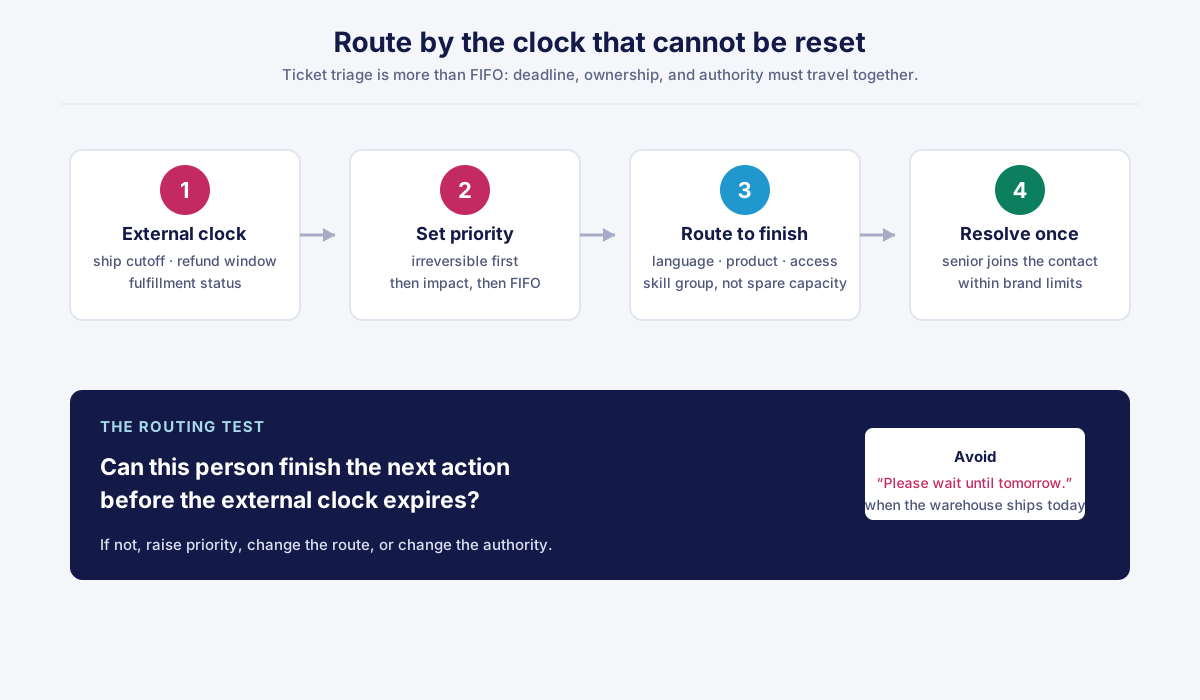
What this looks like in practice: FRT, then FCR, then CSAT
The following example is from a smart-mower account Callnovo.ai supports. The client is unnamed.
During a promotion, a customer noticed 10 minutes after ordering that the delivery address was wrong and emailed after the phone team had closed. The message was seen the next day, after the warehouse had prepared the shipment. Later, the customer’s mower failed during setup. A reply promising that “the technical team will contact you within 24 hours” created another delay. The customer then asked for a refund and prepared a negative review.
The redesigned flow made two changes before discussing sentiment. A keyword rule gave address-change and order-cancellation requests the highest priority, and follow-the-sun coverage allowed an active team to see the message during the customer’s local night. First response fell from 16 hours to under 20 minutes, and more than 95% of wrong-address orders were intercepted and corrected before leaving the warehouse.
| Measure | Before | After |
|---|---|---|
| First response time | 16 hours | Under 20 minutes |
| Wrong-address orders corrected before shipment | — | More than 95% |
The second failure was handled as an internal escalation. A new staff member could bring technical support into the same call rather than asking the customer to repeat the issue later. The third change was a first-contact compensation policy designed with the brand. The brand set the limits; the frontline worker could trigger a reship and provide the defined compensation within those limits. The customer deleted the planned negative review and later posted a positive account of the support experience. A supervisor joining a live call works the same way; our office chair case study walks through one call.
Read these KPIs together. The first response affects how long the customer waits, and what happens during that contact affects whether they have to explain the problem again:
Faster first response → less time for anxiety to compound
        ↓
First-contact resolution → fewer repeated explanations
        ↓
Higher chance of a usable customer outcome
SQM Group reports that each 1% improvement in FCR is associated with a 1% improvement in customer satisfaction in its contact-center research (SQM Group, 2026). The page does not disclose a sample size, so treat that as a vendor research claim, not a universal conversion law. The operational lesson still holds: triage affects the first reply, the first owner, and the authority available at the first contact.
Manual, rule-based, or AI triage: what each one catches and misses
Manual review, rules, and AI classification catch different problems. Choose each method for the mistakes it can prevent, then decide which actions still need a person’s approval. Classifying a request shouldn’t give an unreviewed system permission to make a consequential decision.
| Method | Catches well | Misses or risks | Best use |
|---|---|---|---|
| Manual | Context, exceptions, emotion, unusual requests | Night gaps, inconsistent memory, slow first review | High-consequence exceptions and final judgment |
| Rule-based | Exact phrases, order states, known channels | Wording variants and ambiguous context | Red-line triggers and stable routing |
| AI classification | Paraphrases, intent, language, multiple signals | Confident misclassification and unclear accountability | Suggesting category, priority, or destination for review |
Rule-based triage may catch “change my address” and miss “I typed the wrong street.” AI classification may catch the variant, but that does not mean it should approve the refund or reship. The safer split is to let automation classify and route, while a human agent acts inside limits the brand has set.
Consumer confidence is task-dependent. A Sinch vendor-commissioned survey of 2,501 people across eight markets, reported by CustomerThink in 2026, found 81% willing to give order tracking to AI but only 62% willing to give it payment or billing changes (Sinch, 2026). The number is not an independent benchmark, but the direction is useful: the cost of a wrong answer should determine how much human review remains.
For HeroDash, the documented platform boundary is narrower than “AI runs support.” Lightweight language, intent, priority, and department classification used only for routing is included in the platform fee. The documented foundation also includes triggers and automation, intelligent assignment, multiple brands and working hours; voice capabilities include listen, whisper, and barge-in. Those mechanisms support the process above. They do not turn a classification into permission to issue compensation. Teams comparing service models can also review pricing, multilingual support, and pay-per-resolution delivery as separate operating choices.
Use this test:
- Can the system identify a likely external deadline?
- Can an agent see the order or account context before responding?
- Is the action reversible if the classification is wrong?
- Does the brand-defined authority limit remain in force?
If the fourth answer is no, the automation is making a business decision, not merely routing an automated ticket.
Who triages at 2 a.m.? Handing triage to another shift or an outsourced team
Give the overnight team the rules that make a ticket urgent, along with its queue login. They need to know the deadline, who can act, and which decisions need approval, just as the daytime team does.
One r/CustomerService poster described roughly one-third of tickets arriving between 22:00 and 06:00, with an overnight arrangement that eventually failed and left work waiting until morning. This is a self-reported discussion with no measured sample or operating conditions, so it is a problem signal, not a benchmark. The smart-mower case shows the business consequence more concretely: an email that waits until the next local shift can miss the warehouse cutoff.
| Handoff item | If it is missing | Confirmation owner |
|---|---|---|
| Red-line keyword list | The overnight agent treats an address change as ordinary work | Operations lead and brand owner |
| External-clock rules | Priority becomes a personal judgment call | Fulfillment and support leads |
| Order and fulfillment visibility | The agent promises a change that the platform no longer allows | Systems owner |
| Language and product skill map | The ticket reaches someone who can answer but cannot finish | Workforce and training lead |
| Refund, reship, and compensation limits | The agent either over-acts or tells everyone to wait | Brand owner |
| Escalation contact and response window | “Please wait until tomorrow” becomes the default answer | Senior support owner |
The team can be internal or outsourced. Handoff works only when red-line rules, priorities, and authority limits travel together. Callnovo supports 24/7 follow-the-sun service with 65+ languages through human agents; this Callnovo.ai model creates value when decision rules travel across shifts.
Triage checklist + three questions to ask yourself
Use this checklist before changing a queue or buying an automation feature:
- Have we listed the external events that make a request harder or impossible to fix?
- Do address changes, cancellations, payment changes, and safety issues have explicit red-line triggers?
- Does the agent see fulfillment, payment, and previous-contact context before replying?
- Is each priority target calculated backward from a real clock?
- Does routing reach someone with the language, product skill, system access, and authority to finish?
- Can a senior specialist join the same contact instead of making the customer start over?
- Are refund, reship, and compensation limits written down and confirmed by the brand?
- Does the night or outsourced shift receive the same rules and escalation contacts?
- Are outcome tags recorded so repeated reassignment and missed cutoffs can be reviewed?
Then ask three questions:
- How many change-of-address tickets last week were first answered after the order shipped? If nobody can answer, the triage process is not looking at the external clock that matters.
- When a frontline agent cannot finish a technical case, does the customer stay in the same contact while a specialist joins? If not, the escalation rule is adding a second contact instead of protecting first-contact resolution.
- Could the night-shift agent issue the agreed reship or refund without waking someone up? If not, the coverage is open after hours but the authority is not.
Triage works when the ticket reaches someone who knows how soon to act and has the authority to take the next step. If priority, ownership, and authority send it to three different queues, redesign the rule so the team can finish the work.
References
- Shopify Help Center, Editing orders — Considerations, 2026.
- SQM Group, FCR Metric Operating Philosophy
- CustomerThink, Shoppers are cautious about AI but confident when it has a job to do
- No Jitter, When should contact center AI make the call?, 2026.
- Callnovo, From “Reply Fast” to “Solve Well”: Smart-mower customer support case
- Callnovo, Office-furniture customer support case
Questions buyers ask
- What is ticket triage?
- It is the review step between a support request arriving and a staff member working on it. The team identifies the issue, urgency, impact, deadline, owner, and required authority. Good triage prioritizes the request whose consequences become irreversible first, rather than processing every ticket strictly by arrival time.
- What is the most common mistake in ticket triage?
- The most common mistake is treating first in, first out as a complete priority rule. FIFO ignores external deadlines such as a warehouse ship cutoff, and it can send a change-of-address request behind a routine delivery question. Use arrival order only after deadline, impact, skill, and authority have been considered.
- What is automated ticket triage?
- Automated triage uses rules or machine classification to identify a ticket's likely intent, priority, language, department, or destination. It is most useful for surfacing patterns and routing requests consistently. It should not automatically approve a refund, reship, compensation, or other high-consequence action unless the brand has explicitly defined and limited that authority.
- Can AI-based ticket triage replace human agents?
- AI-based triage can reduce manual classification and route routine requests, but it does not replace human judgment for ambiguous or high-consequence cases. A safer operating model lets AI suggest the category and destination while a human verifies context and acts within brand-defined limits for money, access, privacy, safety, or fulfillment changes.